Free organisations and their resources
Every new account that creates its own organisation starts on the free plan. The idea is simple: signing your own documents is free; sending them to other people for signature is paid for in packs of sends, with no subscription. The plan’s rules come from the same question as all the others: what was paid for? In this case, nothing.
The sign-up screen says so itself, in small print:
Free account: sign your documents. Sending to third parties starts at €4.99 + VAT for 6 sends, no subscription.
What the free plan gives
Section titled “What the free plan gives”| Resource | On the free plan |
|---|---|
| CMD signatures | 2 |
| Simple signatures | 5 |
| Local certificate signatures | 5 |
| Sends to third parties | 1 |
| Drafts at a time | 5 |
| Users | 1 |
| Storage | 250 MB |
A quota that does not renew
Section titled “A quota that does not renew”The amounts in the table are given once. They are not topped up every month like a paid plan: you spend them, and when they are gone, they are gone.
In exchange, they do not lapse. A free organisation has no period and no end date, so the plan’s quota stays until you spend it — “From the plan: {n} (does not expire)” — and the document archive never closes.
If your free organisation had already sent documents to people outside it, the free send counts as used, and the signatures you had already spent count towards the amounts in the table — an organisation that had spent more than 2 CMD or 5 simple signatures has no plan balance left for that resource.
What counts as a send
Section titled “What counts as a send”A send is sending a document to someone who is neither the owner of the organisation nor one of its active members:
- Signing your own document does not use the send. It uses the signatures for the zones you placed, as always — see How a signature is counted.
- It is counted per document, not per person. Ten outside signers on the same document are one send.
- Someone who only receives a copy counts too. Copying in someone from outside uses the send, just like asking them to sign.
- In a bulk send, each individual copy for someone outside is one send.
The send follows the same rule as signatures: it is debited on publishing, and only goes back to the balance if nobody outside was ever contacted — see How a signature is counted.
Where you see the balance: on Home, the Third-party sends line, with what is available over the total and the Buy sends link, which opens the store’s Add-ons; and in the wizard’s Review & Send step, the line Sends to third parties (available / plan), with a note underneath. While you only have the plan’s send:
Sending to someone outside your organization uses your free send. For the next ones, packs from €4.99 + VAT (6 sends, each with its simple signature), no subscription.
And once you have no sends left:
You have no free sends left. If you send to someone outside your organization you will need a pack — you can still prepare the document to the end.
See packs, next to the note, opens the pack offer without sending anything.
When the sends run out
Section titled “When the sends run out”You can prepare the document to the end without anything interrupting you. In the Review & Send step, if the balance is short, a notice under the resource summary tells you straight away — “Your balance doesn’t cover this send. You can top up when sending.”
When you press Send, AssinaJá first asks what is missing, without sending or debiting anything. If nothing is missing, the document goes. If the document counts as a send and you have none left, nothing is sent, the draft is kept, and this opens:
Send this document for signature
The free plan includes 1 send to third parties, which has already been used. Choose a pack to continue. Your draft is saved.
If you had bought sends before and used them up, the text is “You have used all your available sends. Choose a pack to continue. Your draft is saved.”
If signatures are short as well as sends, the dialog is a different one — see If more than one thing is short.
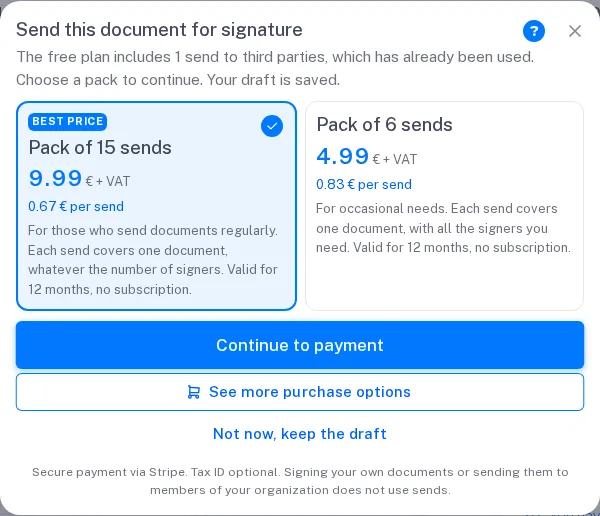
The dialog shows two packs, with the larger one already selected:
| Pack | Price | Per send |
|---|---|---|
| Pack of 15 sends — Best price | €9.99 + VAT | €0.67 |
| Pack of 6 sends | €4.99 + VAT | €0.83 |
- Each send covers one document, with all the signers you need.
- Each send brings one simple signature. A pack of 15 sends also gives you 15 simple signatures, so you do not run out of them on the sixth document.
- It lasts 12 months from purchase, and it is not a subscription: it does not renew.
- Prices are without VAT; VAT is added at payment.
Pick one and press Continue to payment. Payment is on Stripe — “Secure payment via Stripe. The invoice is issued with your organization’s billing details. Signing your own documents or sending them to members of your organization does not use sends.” — and when it finishes you come back to the same draft. A banner at the top confirms it: “Confirming the payment… Your document is saved; as soon as the balance arrives, you can send.” and then “Payment confirmed — you can send now.” The document does not go by itself: press Send again.
If you give up on Stripe, you are back at the draft with “The payment was not completed. Your document is still saved.” If the payment is slow to confirm, the banner says “The payment is taking a while to confirm. The balance will show up shortly; try to send again in a moment.”
The dialog’s other ways out:
- See more purchase options — takes you to the Store, to Add-ons, where there are also the Bundles with sends included (see below);
- Not now, keep the draft, or the × — closes the dialog; the draft stays where it was.
The dialog does not close with Escape or by clicking outside.
When the signatures run out
Section titled “When the signatures run out”The same dialog appears when a type of signature is short — on Send in the wizard, or on Sign in Sign a document yourself. The title and the packs change:
| Short of | Title |
|---|---|
| CMD signatures | Sign with Chave Móvel Digital |
| Simple signatures | Keep signing |
| Local certificate signatures | Sign with your certificate |
The subtitle says how many you had — “You have used the 2 CMD signatures included in the free plan. Add a pack to complete this signature. The document is waiting for you.” — and, if you still have balance in another method, the footer reminds you: “You can also sign with {methods}, if you still have balance.”
The two packs are the store’s two smallest tiers from €2.50 up:
| Short of | Packs in the dialog |
|---|---|
| CMD signatures | 10 for €4.99 · 25 for €11.99 |
| Simple signatures | 50 for €2.99 · 100 for €4.99 |
| Local certificate signatures | 10 for €2.99 · 25 for €5.99 |
All + VAT, valid for 12 months. Payment works as for sends. In Sign now, payment opens in another tab — the document waits in the original one, which confirms the balance by itself; when the Stripe tab finishes it says “Payment confirmed. You can close this tab and go back to the previous one to sign.”
If more than one thing is short
Section titled “If more than one thing is short”When two things are short at once — sends and CMD signatures, for example —, you buy everything together, in one dialog and one payment:
To send, you need these packs
Choose one pack of each and pay once. Your draft stays saved.
There is one section for each thing that is short — Pack of sends, Pack of CMD signatures, Pack of simple signatures —, each with the same two packs that thing’s own dialog would show, the larger one already selected. Underneath, the total of what you chose: “Total: {amount} + VAT”. Continue to payment goes to Stripe once, and the invoice has one line per pack. An Initials zone uses a simple signature, so the simple-signature pack can appear even when the signer uses CMD.
If one of the missing packs cannot be bought right there, the dialog goes back to one thing at a time: the first warns “Afterwards we will also ask you for …”, and the second, after payment, is called Just one more step.
The offer before you start
Section titled “The offer before you start”Once you have spent something — a send, a simple signature or a CMD —, New document first opens an offer of send packs:
Buy sends to send documents
Signing your own documents is free. To send them to other people for signature, buy sends as you need them, with no subscription.
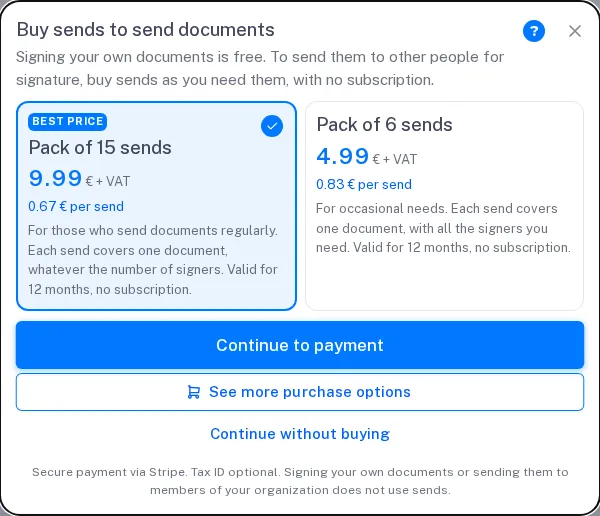
It is not a limit. Continue without buying carries on as if the dialog had not appeared. The same offer opens with See packs, next to the sends note in the Review & Send step.
Five drafts at a time
Section titled “Five drafts at a time”A free organisation can have 5 drafts at the same time. When you try to create the sixth — in the Documents step, when you press Next — you see:
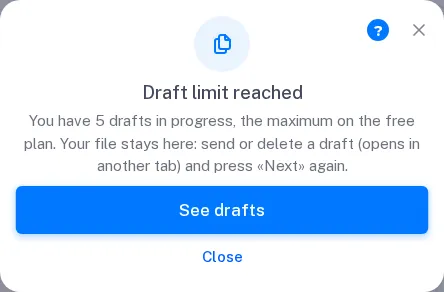
Draft limit reached
You have 5 drafts in progress, the maximum on the free plan. Your file stays here: send or delete a draft (opens in another tab) and press «Next» again.
The number is your organisation’s limit. See drafts opens the list of drafts in another tab; the wizard stays open in this one. Close closes the notice.
The file stays in the Documents list, waiting. After you send or delete a draft in the other tab, press Next again: the file is uploaded and the wizard moves on to Recipients.
Drafts you deleted do not count, and the ones you already have still open, edit and send as normal.
Buying without waiting for the limit
Section titled “Buying without waiting for the limit”You can also buy in the Store, under Add-ons, paid with credits: the Sends to Third Parties row, the signature rows, and the Bundles — Pack Assina+ and Pack Assina IA, which on a free organisation also bring sends (15, 30 or 60). See Extras.
Moving to a paid plan
Section titled “Moving to a paid plan”On a paid plan, sends to third parties are unlimited and the draft limit does not apply. The plan starts with its whole quota, and users and storage become the paid plan’s — the free plan’s are not added on top. What was left of the free quota does not carry over: a plan change carries over the leftover that was paid for, and the free plan’s was not. Any signature packs you bought come with you, with their dates.
If you still have free signatures left and are in no hurry, it is worth spending them before you switch.
One person only
Section titled “One person only”The free plan is for one person. To bring in colleagues you need a plan with more users — see Invite people to your organisation.
The confirmed mobile number
Section titled “The confirmed mobile number”A free organisation only sends documents once whoever created it has confirmed their mobile number by SMS, once. A new email costs nothing to create; a confirmed mobile number does. It is how the free plan stays available to people who use it in good faith, without being multiplied by someone who would create dozens of accounts to send for free.
Paid plans do not ask for this confirmation. Neither do invited signers. The steps are in Confirm your mobile number.
If you created a free organisation and it is really your company’s
Section titled “If you created a free organisation and it is really your company’s”A free organisation of your own can be swapped for your company’s: see Request to join your company’s organisation.