Manage your subscription
Everything below is under Store, in the main menu, spread across the Plans, Add-ons, Subscription, Credits and Billing tabs. For what plans, extras and credits actually are, see Plans, credits and extras.
Top up credits
Section titled “Top up credits”Under Credits, choose Top Up. Pick a preset amount or Enter custom amount — the minimum is 10€ (“Minimum amount is 10€”), and the figure shown is VAT included.
Payment goes through Pay with Stripe. If the session cannot be created you get “Failed to create top-up session. Please try again.”
Buy extras
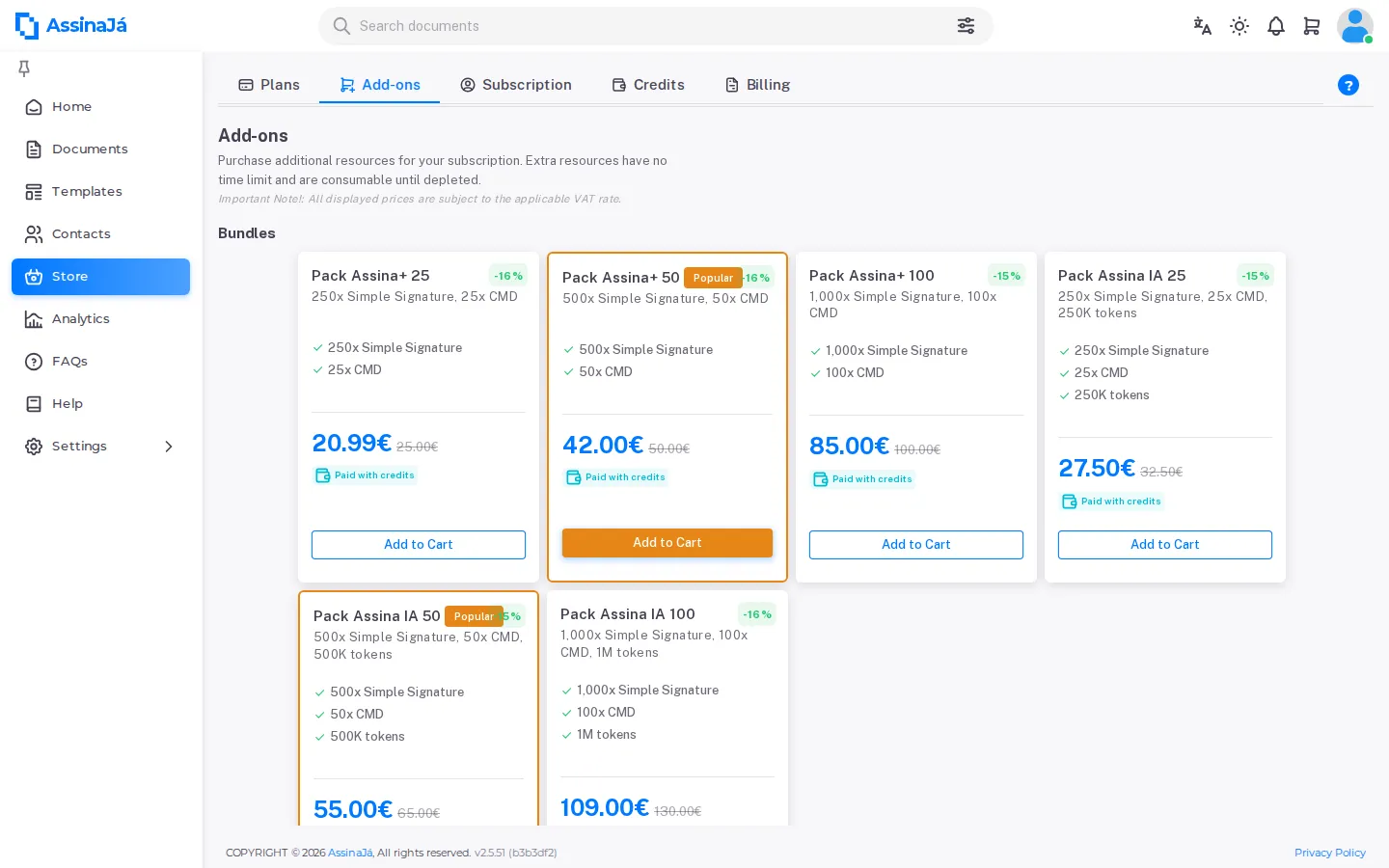
Section titled “Buy extras”Under Add-ons, choose one of the Bundles or an individual feature and set the Quantity. The page shows the price per unit and a running Total. Every offer carries the Paid with credits tag.
At checkout, the button depends on what is in the cart:
| In the cart | Pays with |
|---|---|
| Extras only | Pay with Credits — deducted from your balance |
| A plan | Pay with Stripe — by card |
Extras are paid with credits only. If the balance does not cover the cart, checkout does not go ahead and Top Up Credits opens instead: top up and check out again. Success is Purchase completed successfully!
The cart does not mix the two ways of paying. Adding an extra to a plan (or the other way round) brings up Different payment types, and you choose between Clear and add and Cancel.
Invite people to the subscription
Section titled “Invite people to the subscription”Invitations and plan seats are managed outside the store, under Settings → Organization → Users — see Invite people to your organisation.
If the plan has no seats left
Section titled “If the plan has no seats left”When all the plan’s seats are taken, Upgrade plan brings you to the store to add more. The dialog and what it changes are in Invite people to your organisation.
See your plan and usage
Section titled “See your plan and usage”The Subscription tab opens with My Subscription — the plan name, its status, the dates and Resource Usage. What each field means is in Plans, credits and extras.
From here there are only two ways on:
- Change Plan takes you to the Plans tab — with the plan expired, the button reads Renew plan.
- Buy more → appears on a feature that is 80 % or more used, and takes you to Add-ons.
UNVERIFIED: the Subscription screen has no button to stop a plan’s recurring payment, nor to leave or delete the subscription. Where that is done is still to be confirmed.
Choose or renew the plan
Section titled “Choose or renew the plan”On the Plans tab, Billing period: switches between Monthly and Annually, and the cards show that period’s prices. Each card’s button says what choosing it does:
| Button | When it appears |
|---|---|
| View Usage | On the plan you are on — takes you to the consumption on the Subscription tab |
| Upgrade | On a plan above yours |
| Unavailable | On a plan below yours; and, on an annual plan, on the monthly plans up to yours |
| Renew plan | On your plan, already expired, viewing the same period you had |
| Subscribe | On the other plans, with your plan expired |
With the plan expired there is no plan in force to protect: you can buy the same plan again, monthly or annual, or any other.
When a subscription expires
Section titled “When a subscription expires”Passing the Expires date does not close the organisation, and nothing you bought is lost that day. The plan shows as Expired on the home screen, and:
- the plan’s quota still counts for 10 days — the time Stripe spends retrying a renewal that failed;
- packs keep being spent until each reaches 12 months, with or without a plan — while there is balance, you keep sending;
- whoever already received a document from you signs all the same;
- the organisation’s documents can be downloaded until 60 days after the end of the plan and of the last pack.
A current subscription is still required for templates — “Action failed. The subscription from which this template originated has expired.” — and for invitations — “It is not possible to add users to an expired subscription”.
Each case, with the reasoning behind it, is in What happens in each case.
Related
Section titled “Related”- Plans, credits and extras
- Invite people to your organisation
- Roles and permissions — by default, only Owner and Administrator can purchase or manage billing