Track and manage documents
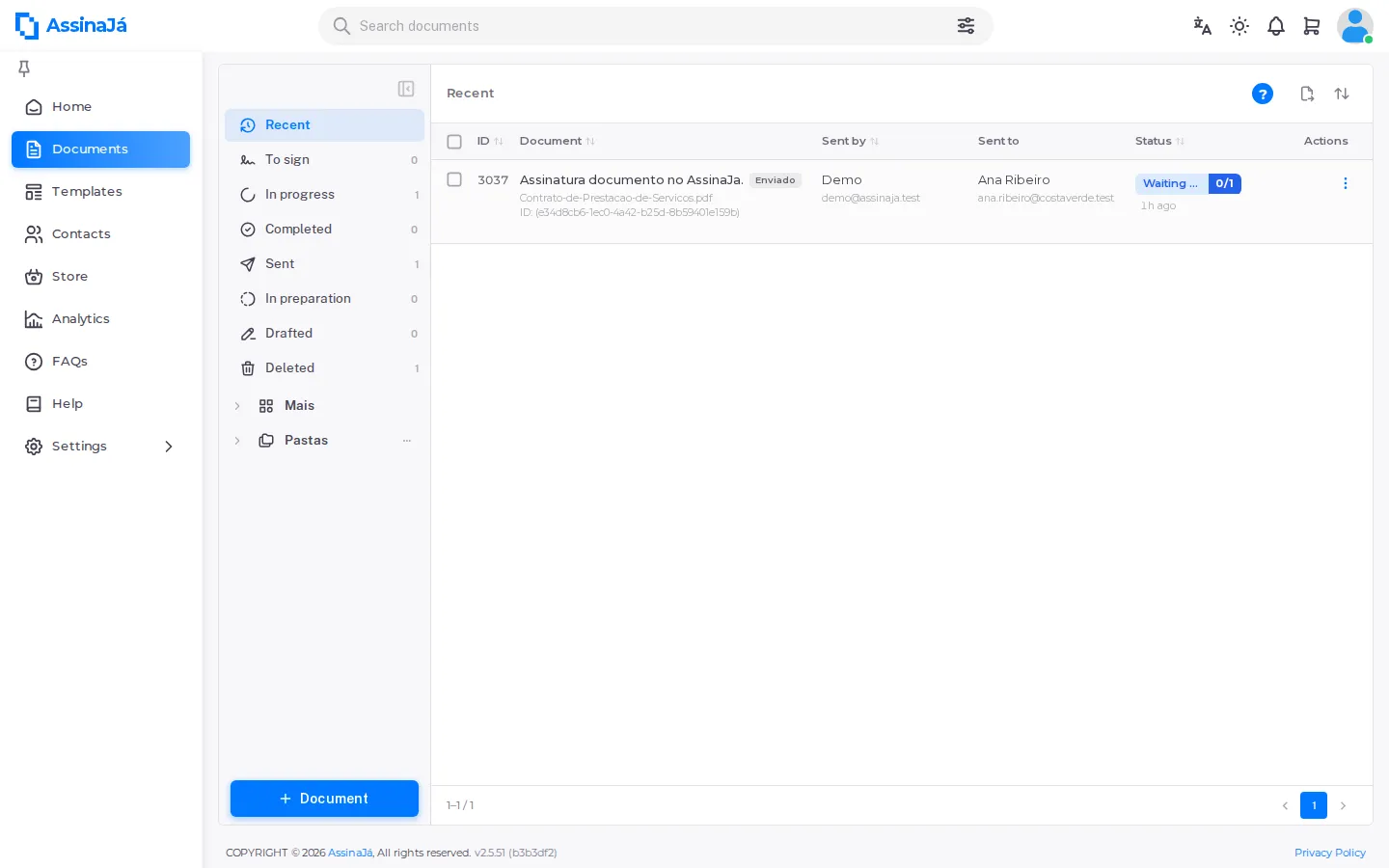
The document list is where a document lives after you send it. It is split into views so that “waiting on me” never gets lost among “waiting on everyone else”.
The views
Section titled “The views”| View | What it holds |
|---|---|
| Inbox | Documents sent to you |
| Sent | Documents you sent |
| Drafted | Started but never sent |
| In preparation | Being sealed by the platform before going out — in the status field, these documents show as Processing |
| Recent | Recently touched, across the other views |
| Deleted | Deleted, and still recoverable |
You can group documents further with Add folder and Move to a folder.
The list refreshes on its own — “The list refreshes automatically” — so you do not need to reload to see a signature arrive.
Seeing who still has to sign
Section titled “Seeing who still has to sign”Each sent document shows its recipients’ individual states, which is more useful than the document’s overall status when you are chasing someone:
| Shown as | Meaning |
|---|---|
| Waiting for recipient to sign | It is their turn and they have not signed |
| In queue to sign | Their turn has not come up yet |
| Signed | Done |
| Rejected | They declined |
| Canceled | Cancelled before they signed |
In queue to sign versus Waiting for recipient to sign is the distinction worth knowing on a sequential document: only the second means someone is actually holding things up.
On an all-at-once document nobody is in a queue — everyone was invited at the same time, so everyone outstanding shows as Waiting for recipient to sign. See Send a document for signature.
The document detail shows finer states, three of which only appear while the signature is being applied:
| Shown as | Meaning |
|---|---|
| Applying | This person has signed; the platform is writing the signature into the PDF. |
| Applying (delayed) | The same, but taking longer than usual. It still finishes on its own. |
| Could not sign | “It was rejected or canceled before your turn” |
Applying is normal and clears by itself — there is nothing to do, and no need to ask the person to sign again.
The Order field in the same panel tells you which order the document went out with: Yes is sequential, No is all at once.
What you can do with a document
Section titled “What you can do with a document”Each document’s menu in the list changes with its state — and, in Waiting, with your role in it too:
| State | Details | Download | Move | Delete | Cancel | Other |
|---|---|---|---|---|---|---|
| Draft | — | — | — | Yes | — | Continue |
| Processing | Yes | — | disabled | — | Yes | — |
| Waiting | Yes | Only the sender, when not a signer | disabled | Yes | Sender only | Sign when it is your turn; Reject if you are a signer; Resend email if you sent it |
| Finalizing | Yes | Yes | Yes | Yes | — | — |
| Completed | Yes | Yes | Yes | Yes | — | — |
| Rejected / Cancelled / Expired | Yes | Yes | Yes | Yes | — | — |
| Error | Yes | Yes | Yes | Yes | — | — |
- Details opens the document detail, with each recipient’s status and the audit trail.
- In Finalizing and Completed the entry is Download signed; in the other states it is Download. A document in Error does not offer Download signed, because it was never signed.
- View, to see the PDF without downloading it, is under the Download button on the document detail, not in the list menu.
- Move stays visible but disabled while the document is in flight.
- On a document in the Deleted view, Delete gives way to Restaurar (the screen shows this label in Portuguese whatever your language).
UNVERIFIED: what Download signed returns while the document is still Finalizing — before the final seal is applied — still needs confirming against the running application. Everything else in the table comes from the menu’s code.
Cancel is allowed to whoever sent the document, the Owner and an Administrator of the organisation. In the list menu, that full rule applies to a document in Processing; in Waiting, the entry appears only to the person who sent it.
Outside the table, some entries depend mostly on your role in the organisation:
| Action | When it appears |
|---|---|
| Change owner | To the document’s owner, the Owner or an Administrator, in any state; disabled when there is nobody to pass it to |
| Share signing link | Only in Waiting, to the document’s owner, the Owner or a Manager |
| Unblock verification | Only in Waiting, to the document’s owner, the Owner, an Administrator or a Manager |
| Delete permanently | Only to whoever may delete that document — see below |
Share signing link and Unblock verification appear only on an in-flight document, and only to people responsible for the send — each has its own section below.
What each state means is in Document lifecycle.
Giving the signing link over another channel
Section titled “Giving the signing link over another channel”When someone says the email never arrived — or they deleted it, or their mail is held up — Share signing link gives them the same link over any channel:
Choose the signer and share the signing link over any channel. It is the same link the signer received by email.
Pick the person and use Copy link. Beside each name the dialog says whether they Can sign now or are Waiting for their turn — in a sequential order, someone whose turn has not come opens the link and sees exactly that.
The link needs no sign-in: whoever holds it can sign. That is why this action is narrower than the others — it is available to the document’s owner, to the Owner and to a Manager, and not to an Administrator. If nobody is left to sign, the dialog says so: “This document has no pending signatures.”
Unblocking someone stuck on verification
Section titled “Unblocking someone stuck on verification”Someone who gets the verification code wrong too many times has to wait out a cooldown. Unblock verification clears that count:
A signer who runs out of verification code attempts has to wait for the cooldown to end. Unblocking clears that count and lets them request a new code straight away. Their signing session is not lost.
Choose the signer and press Unblock. Unlike sharing the link, this action is also available to an Administrator.
On the other side, the person who is blocked is told to ask whoever sent it: “If you need to sign right away, ask whoever sent you the document to unblock verification.”
Handing a document over
Section titled “Handing a document over”Change owner transfers responsibility:
The document moves to the member you pick. They take over the signatures and anything still outstanding; it leaves your documents.
Pick the person under New owner. If you are the only person in the organisation you will see “There are no other users in this organization.”
Deleting
Section titled “Deleting”Deleting is not as final as it sounds, but it is not harmless either:
A document that has already finished keeps the state it had, and restoring it brings it back exactly as it was — see Deleted is not a state.
Deleting a draft is separate and immediate: “This will delete the draft permanently.”
Delete permanently
Section titled “Delete permanently”In the Deleted view, Delete permanently is exactly what it says:
Notice what stays: the audit trail and the usage history. The file goes; the proof that it existed and who touched it does not.
To confirm, the dialog asks you to type the word DELETE — pressing a
button is not enough.
Two limits worth knowing before you try:
- Only the document’s owner can do it. In a selection holding other people’s documents, those are skipped: “{{count}} item(s) skipped: only the document’s owner can delete it permanently.”
- Without permission: “You do not have permission to permanently delete documents. Contact your organization administrator.”
Exporting the list
Section titled “Exporting the list”The export button takes the documents in the list into a file, and the result arrives by email, not through the browser: “The export will follow by email.”
Before exporting you choose:
| Option | What it does |
|---|---|
| This view | Everything the current view shows |
| Selection | Only the rows you ticked — “Tick rows in the list to export only those.” |
| From / To | Limit by date |
| Status | Limit by document status |
| Separator | Comma, semicolon or tab |
The separator exists because an Excel set to a European locale does not open a comma-separated file cleanly. If every column lands in one, this is the field to change.
A custom filter ignores the view’s search — that is what “A custom filter ignores the view’s search.” means. With no results: “Nothing to export with these criteria.”
When the signature does not get applied
Section titled “When the signature does not get applied”If something goes wrong writing the signature into the PDF, the document detail shows a Technical issue notice:
There was a problem applying the signature. You can try again.
Try again repeats the operation. The button is for the document’s owner only, and nobody’s signature is lost: what gets retried is applying it to the PDF, not the signing itself.
Checking whether the webhook was delivered
Section titled “Checking whether the webhook was delivered”If your organisation uses webhooks, the document detail shows the last delivery — see Receive webhooks.
When an action fails
Section titled “When an action fails”If the organisation’s plan and its last purchased pack ended more than 60 days ago, it is downloading that stops working — the other actions do not look at the date:
- “Download no longer available. The subscription and the last purchased pack ended over 2 months ago.”
- “Action failed. The subscription from which this template originated is in Trial and has expired.”
The document is not lost — the subscription needs renewing before you can download it again. See When a subscription expires.