Plans, credits and extras
Three separate things decide what your organisation can do: the plan you subscribe to, the extras you buy on top of it, and the credit balance you pay for extras with. They behave differently, and the differences matter. All three live inside a subscription, which is the thing you pay for.
The subscription
Section titled “The subscription”The subscription is what you pay for, and it is the container for everything else: it carries the plan, the allowances, and the people who have access. Anyone who joins a subscription starts consuming its allowances. Documents stay tied to the subscription they came from. A subscription that passes its expiry date blocks neither sending nor signers: the plan’s quota counts for 10 more days, packs are spent until their 12 months, and the archive stays open for 60 days after both have ended — see Why nothing you buy is lost.
The Subscription tab opens with My Subscription — “View your plan details and resource usage.”:
| Field | |
|---|---|
| the plan name | the plan in force, with its status beside it |
| Billing cycle | Monthly or Annually |
| Subscribed on, Expires | the two dates that matter |
| Remaining n days | the countdown to expiry |
| Public Id | the identifier to give support when you ask for help |
| Notification email | where the subscription’s notices go |
| Created by | who created it |
The status is one of three: Expired once the plan’s validity has passed, Trial during the trial period, and Active in every other case.
Also here, Resource Usage shows consumption feature by feature. Change Plan takes you to Plans — with the plan expired, the same button reads Renew plan. A feature that is 80 % or more used gets Buy more →, which takes you to Add-ons. With no subscription, the tab says Subscribe to a plan first.
The plan
Section titled “The plan”Your subscription grants an allowance of each feature. On the Plans tab, the card of the plan you are on has a View Usage button, which takes you to the consumption on the Subscription tab.
With the plan expired, that plan’s card turns into Renew plan, and the others into Subscribe — see Manage your subscription.
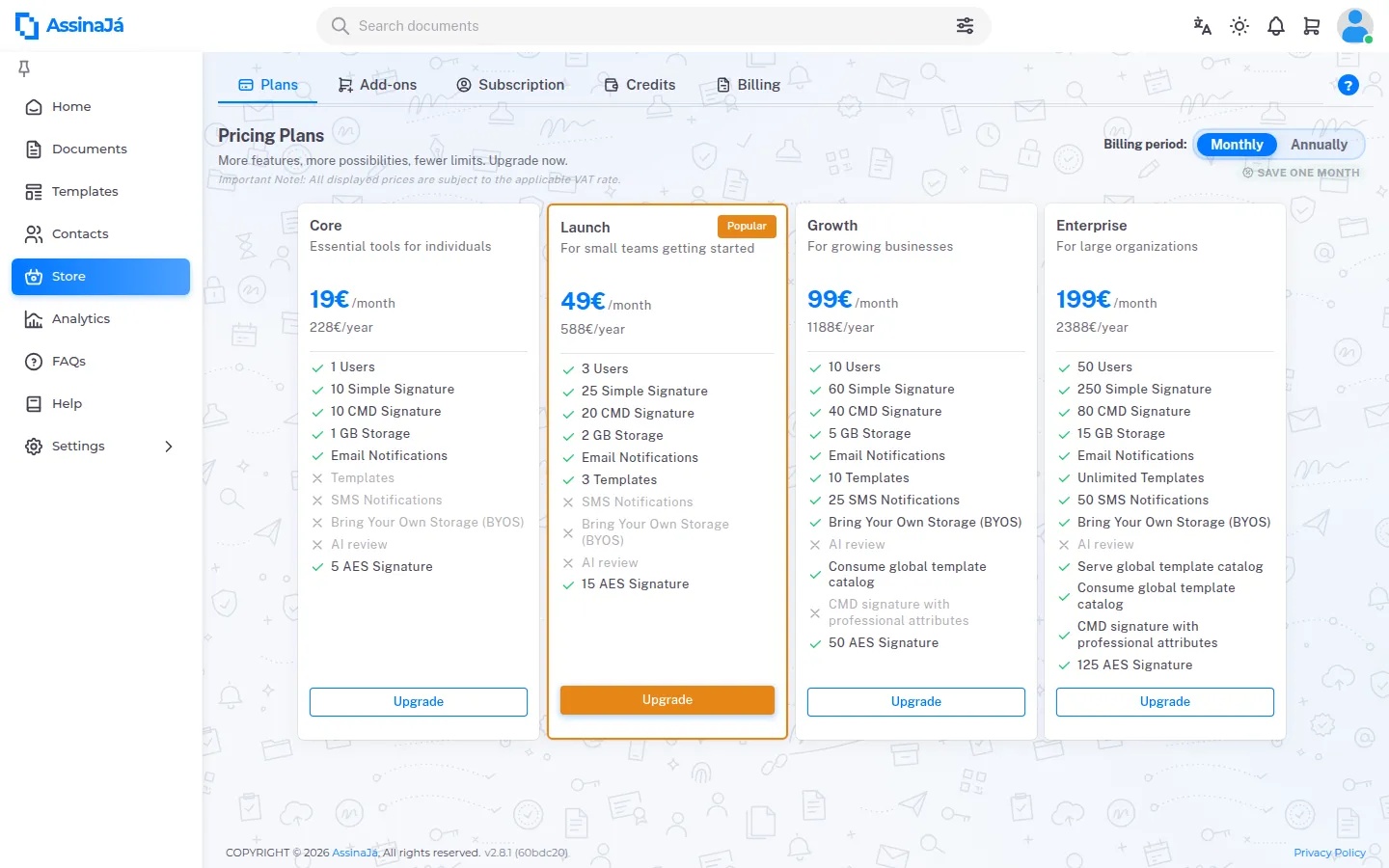
The metered features are:
| Feature | |
|---|---|
| Simple Signatures | Simple signatures without digital certificate |
| CMD Signatures | Qualified signatures with Mobile Digital Key |
| Advanced Signature (Local Digital Certificate) | Signatures with the signer’s own Local Digital Certificate |
| Qualified PKI digital certificates | |
| Storage | Additional space for document storage |
| SMS Notifications | SMS notifications for signatories |
| Email Notifications | |
| AI review | AI-powered document review |
| CMD signature with professional attributes | Signing with the Digital Mobile Key and professional attributes (SCAP) — included only in the Enterprise plan |
| Templates | |
| Users | |
| Bring Your Own Storage (BYOS) |
Usage is shown as used against remaining, or Unlimited where the plan has no cap. On a plan’s card, a feature the plan does not include appears by name, greyed out and with a cross.
Signing with professional attributes (SCAP) is only available with an Enterprise subscription in force. See CMD and CMD with Professional Attributes.
The plans themselves — which ones exist, what each includes and what they cost — are platform configuration and can change without this page changing. The current list is always at assinaja.pt/precos; that is the source, not this page.
How a signature is counted
Section titled “How a signature is counted”The allowance is spent per signature zone placed on the document, and each zone pays for the resource of its own type. Not per document, and not per person.
| On the document | Charges |
|---|---|
| One simple signature zone | 1 Simple Signature |
| One initials zone | 1 Simple Signature |
| One CMD or SCAP zone | 1 CMD Signature |
| One Local Digital Certificate zone | 1 Advanced Signature (Local Digital Certificate) |
Three consequences that cost money:
- Initialling every page costs one simple signature per page. Twenty initialled pages are twenty simple signatures. It is legitimate and common use, but it should be a decision rather than a surprise.
- Initials belonging to a CMD signer cost a simple, not a CMD. A zone is worth what the zone is, not what the person’s strongest method is.
- Each person may have only one qualified zone per document. Signing with the Digital Mobile Key is an act on the whole document: one pass seals it and fills in all of that person’s visual zones. See Send a document for signature.
The balance is checked before sending has any effect: if it falls short, nobody is invited and nothing is charged.
The charge belongs to the send. From the moment anyone outside is contacted or acts — the invitation sent, the link opened, a code sent, a signature, a refusal — the charge stays: cancelling, deleting, declining or letting the document expire gives nothing back. Only what was charged without anyone being contacted goes back to the balance — a send that failed during preparation, for example — and exactly what was charged goes back, to where it came from.
Extras
Section titled “Extras”When an allowance runs out you do not have to change plan. Add-ons sells more of a single feature:
Purchase additional resources for your subscription. Extra resources have no time limit and are consumable until depleted.
The sentence is wrong about the time limit, and the distinction matters:
Extras come either as Packs — Pack Assina+ 25 / 50 / 100 for signatures and Pack Assina IA 25 / 50 / 100 for AI reviews — or as Individual Features priced per unit (per SMS, per Review, 1K tokens).
You need a plan before you can buy extras: Subscribe to a plan first.
Credits
Section titled “Credits”Credits are stored value, and they are the way to pay for extras:
Add credits to your account. Credits are used to purchase extras and packs instantly.
Credits are bought by card; extras are bought with credits; a plan is paid by card. A cart of extras only pays with Pay with Credits, with no card alternative — if the balance is short, checkout opens Top Up Credits. How to top up, and the minimum, is in Manage your subscription.
Credit Movements is the ledger — “Track all credit top-ups, purchases, and adjustments” — recording every top-up, purchase and adjustment with its date and type.
Billing
Section titled “Billing”Billing is the history: “View invoices from your previous purchases and payments.” One row per purchase, with Invoice, Date, Amount, Status and Actions. With no purchases it says No invoices yet.
Who the invoice is issued to is decided at payment, in the Tax ID / VAT number field — “Required for invoice issuance”.
There are two different statuses on the same row, and mistaking one for the other gives you the wrong idea:
| Column | Is about |
|---|---|
| Status | the payment — Paid, Pending, Cancelled or Refunded |
| Actions | the invoice, with one icon per state |
The Actions icon is the invoice itself, and there are five cases:
| What you see | What it means |
|---|---|
| Grey clock, not clickable | “The invoice will be available shortly.” |
| Download arrow | ready — Download invoice |
| Faded file | Invoice cancelled. It can still be downloaded, deliberately: the annulled document is yours too. |
| Red alert | “The invoice could not be generated. Please contact support.” |
| Empty cell | that purchase does not produce an invoice |
Anyone with permission to manage billing sees a Try again beside the red alert, which answers “Request sent again. The invoice will be available shortly.” Downloading does not need that permission — if you can see the tab, you can download.
A pending or failed invoice does not mean the payment did not go through:
that is the two columns saying different things. A payment can be Paid with
the invoice still on its way.
The same icon appears under Credit Movements — a credit top-up produces an invoice too.
How they fit together
Section titled “How they fit together” Plan ──► allowance per feature, resets each period │ (lasts until the end of the period + 10 days) │ └─ runs out ──► buy an Extra ──► paid for with Credits (topped up by card) │ └─ lasts 12 months, with or without a planWhere to find each
Section titled “Where to find each”| Tab | For |
|---|---|
| Plans | Comparing and changing plan |
| Add-ons | Buying extras |
| Subscription | The plan in force, the dates, and resource usage |
| Credits | Balance, top-ups and movements |
| Billing | The invoices for your purchases, and each one’s status |
Subscription members are not managed in the store: they live under Settings → Organization → Users — see Invite people to your organisation.