Accept an invitation
When someone adds you to an organisation, you get a link by email. Opening it is what grants access — before that, you see nothing. (To send invitations, see Invite people to your organisation.)
When it works
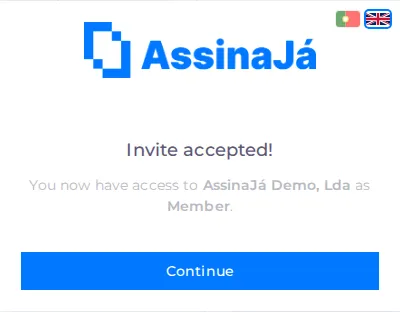
Section titled “When it works”Invite accepted!
You now have access to {organisation} as {role}.
The role is Administrator or Member. Here, Member covers every other role — Manager, Operator or Viewer — and is not a role of its own. Choose Continue and you go straight into the organisation.
What each role allows is in Roles and permissions.
When it does not
Section titled “When it does not”Wrong account
Section titled “Wrong account”This invite was sent to {email}. Sign out of the current session and sign in with that account to accept it.
This is the common case, with a mundane cause: you were signed in with another account — the personal one, typically — and the invitation went to the work one.
The invitation is bound to the address it was sent to. It does not transfer. Choose Sign out and sign back in with the right account.
If the system cannot show you which address it was, the message is the generic one: “This invite belongs to a different account. Sign out of the current session and sign in with that account to accept it.”
Invalid invitation
Section titled “Invalid invitation”This invite link is invalid, has expired, or is no longer available.
All three causes give the same message, and none is fixable from your side. Ask whoever invited you for a new one — the old link will not start working again.
Before asking, check you did not accept it earlier: if you already have access to the organisation, the link stops being available precisely because it did its job.
If you do not have an account yet
Section titled “If you do not have an account yet”The invitation is for an address, not for an existing account. If you have never used AssinaJá, create the account first with that same address and accept the invitation afterwards — see Sign in.
Using a different address leads to the Wrong account error above.
Invitation or join request
Section titled “Invitation or join request”An invitation is the path where the organisation calls you in. The reverse path is the join request: you ask to join, in the step right after registration, and whoever manages the organisation decides. If you sent a request and are waiting, see Ask to join your company’s organisation. A pending invitation takes precedence over a request: if you receive one, the invitation is what counts.